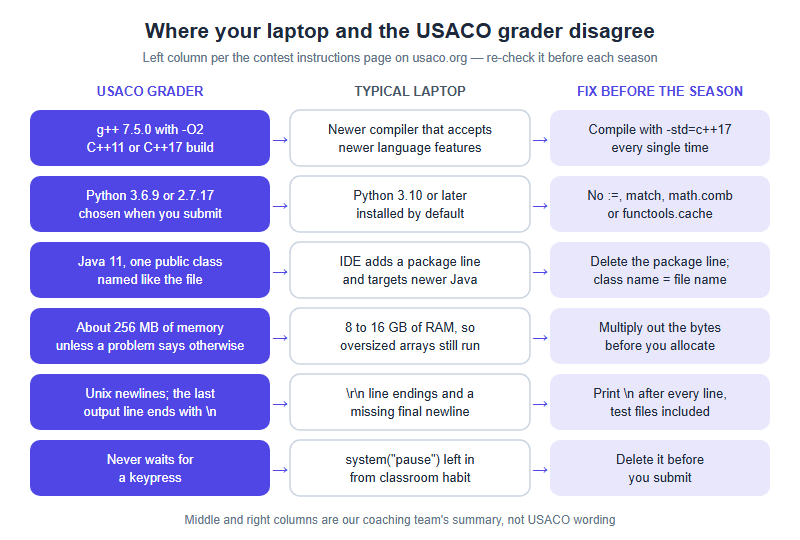
USACO grades your program on a Linux machine with fixed language versions: its contest instructions list g++ with -O2 and a C++11 or C++17 build, Java 11, and Python 3.6.9 or 2.7.17, plus a memory limit of about 256 MB and Unix line endings. Your laptop almost certainly differs on several of those points. A good setup makes every mismatch fail at home in September, not as a red box halfway through a contest.
What the grader runs, and where a typical laptop disagrees
The grader facts here come from the contest instructions page on usaco.org as currently published. That page can be revised between seasons, so read it again before your first contest window; our rules summary is orientation, not a substitute.
C and C++ are compiled with gcc/g++ 7.5.0 using -O2, with C++11 or C++17 enabled, and the instructions ask you to pick the right language from the drop-down when you submit. Java runs on OpenJDK 11. Python is offered as 3.6.9 or 2.7.17, chosen at submission. Unless a problem states otherwise, programs get about 256 MB of memory, must be under 100,000 bytes and must compile within 30 seconds. A recent laptop disagrees with most of that by default, and each disagreement has its own way of costing points.
| Grader fact (per usaco.org) | What a typical laptop does | How it fails | Fix before the season |
|---|---|---|---|
| g++ 7.5.0, C++11 or C++17 build | A newer compiler that accepts newer language features | A C++20 feature such as map::contains compiles at home and is rejected on submission |
Compile with -std=c++17 every time; stay with mainstream containers and algorithms |
| Python 3.6.9 or 2.7.17, chosen at submission | Python 3.10 or later | The walrus operator, match, math.comb or functools.cache stop the program |
Check python3 --version and keep a do-not-use list |
| OpenJDK 11; exactly one public class, named like the file; no package line | An IDE that adds a package line and targets a newer Java | A compile error, or records and switch expressions that Java 11 does not know | Delete the package line; match class and file name |
| About 256 MB of memory | 8 to 16 GB of RAM | A grid that runs at home shows ! — run-time error or memory limit exceeded | Multiply out the bytes before you allocate |
| Unix line endings; every output line, including the last, ends with a newline | Editors that save \r\n endings and leave the last line without one |
The classic “works on my system but not on the server” | Print \n after every line; make test files end with a newline too |
| Never waits for a keypress | A leftover system("pause") from classroom habit |
The grader waits, then reports something like an empty output file | Delete it before submitting |
Memory deserves ten seconds of arithmetic, because the grader’s own description gives the sizes: an int is 32 bits (4 bytes) and a long long is 8 bytes. One million ints is about 4 MB and ten million long longs about 80 MB, both fine. A 5,000 × 5,000 grid of ints is about 100 MB and fits; a 10,000 × 10,000 grid is about 400 MB and fails before anything else is stored. Python is heavier still, because a list keeps a reference plus a separate object for each distinct number, so ten million of them can run to several hundred megabytes. The instructions also warn that answers usually fit a 32-bit integer but are not guaranteed to, so any sum that can pass about two billion needs a 64-bit type whether or not the statement mentions it.
Windows: pick one of three setups, then remove four traps
Three Windows setups work well; the choice mostly depends on how closely you want your machine to resemble the grader.
- WSL (Windows Subsystem for Linux). A real Linux distribution inside Windows 10 or 11, installed from an administrator terminal with
wsl --install. You get Linux g++ and working sanitizers — the closest a Windows laptop gets to the grader, and our first suggestion for anyone training across more than one season. - A native MinGW-w64 g++, for example installed through MSYS2 and driven from any editor. Perfectly workable. Sanitizer support in Windows GCC builds is patchy, so rely on the library debug mode in the test-loop table instead.
- A classroom IDE you already know. Fine, if you check its bundled compiler with
g++ --versionand set-std=c++17explicitly. Older bundled compilers can default to an old language standard, so correct code fails to compile for reasons unrelated to the problem.
Whichever you choose, remove these four traps on day one:
- Non-ASCII folder paths. Some toolchains and debuggers misbehave when a path contains non-ASCII characters — on many machines in China, a Chinese account name inside
C:\Users\. Keep practice work in a plain folder such asC:\usaco. - PowerShell rejects
<. Typingsol.exe < in1.txtin PowerShell, the default terminal in many Windows editors, produces an error saying the operator is reserved for future use. Runcmd /c "sol.exe < in1.txt"instead. fcmeans something else in PowerShell. The Windows file-compare tool has to be called asfc.exethere, because plainfcis an alias for an unrelated formatting command.- A small default stack. Windows programs get a default stack of only a megabyte or two, so deep recursion can crash locally on input your logic handles correctly. USACO’s instructions state no separate stack figure, so treat deep recursion as unsafe on both machines: write long traversals iteratively, or raise the local stack while testing (with MinGW, a linker flag such as
-Wl,--stack,268435456).
Mac: why bits/stdc++.h fails, and what to do about Python
On a Mac, installing the developer tools with xcode-select --install gives you a command called g++, but it runs Apple’s clang, which uses a different standard library from GCC. That library does not include GCC’s non-standard bits/stdc++.h header, so #include <bits/stdc++.h> — a line copied from countless online solutions — fails at home even though it compiles on the grader’s GCC.
Two clean fixes. Install real GCC with brew install gcc, which adds a versioned command such as g++-14 (the number is whichever major version Homebrew currently ships; plain g++ still points at clang). Or include the headers you use, such as <iostream>, <vector> and <algorithm>, which compiles everywhere. Many students use Homebrew GCC for contest builds and Apple clang with explicit headers for -fsanitize=address,undefined, which reports many out-of-bounds accesses and signed integer overflows at the moment they happen, instead of letting the program quietly print a wrong answer.
Python on a recent Mac is usually far newer than the grader’s 3.6.9. Run python3 --version, and if it is past 3.6, keep this do-not-use list beside you on any operating system: no walrus operator :=, no match statements, no math.comb or math.isqrt, no functools.cache (use lru_cache(maxsize=None)), and no f"{x=}" debugging syntax. Ordinary f-strings are fine; they arrived in 3.6.
A local test loop you can run in thirty seconds
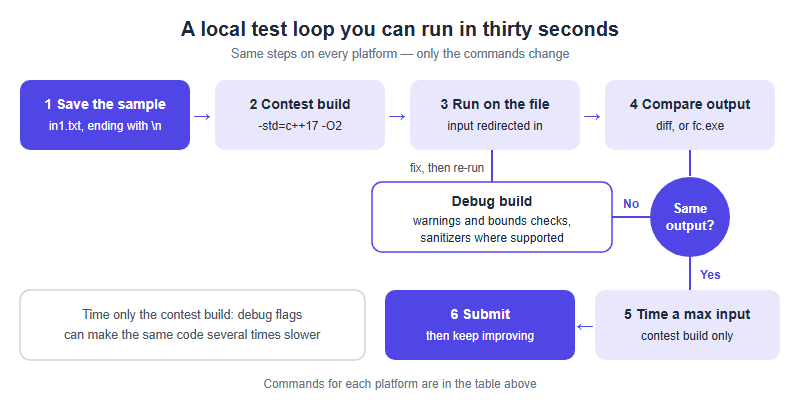
The loop is identical on every platform; only the commands change. The sample goes into a file once and is never retyped, the contest build uses the grader’s flags, and a separate debug build exists for when something is wrong.
| Step | Linux or WSL (g++) | Windows PowerShell (MinGW g++) |
|---|---|---|
| Contest build | g++ -std=c++17 -O2 -o sol sol.cpp |
g++ -std=c++17 -O2 -o sol.exe sol.cpp |
| Debug build | g++ -std=c++17 -g -Wall -Wextra -D_GLIBCXX_DEBUG -fsanitize=address,undefined -o dbg sol.cpp |
g++ -std=c++17 -g -Wall -Wextra -D_GLIBCXX_DEBUG -o dbg.exe sol.cpp |
| Run on the sample | ./sol < in1.txt > my1.txt |
cmd /c "sol.exe < in1.txt > my1.txt" |
| Compare | diff my1.txt out1.txt |
fc.exe my1.txt out1.txt |
| Time a large input | time ./sol < big.txt > /dev/null |
Measure-Command { cmd /c "sol.exe < big.txt > nul" } |
| Python instead | python3 sol.py < in1.txt |
cmd /c "python sol.py < in1.txt" |
g++-NN for contest builds and clang++ with explicit headers for sanitizer builds. -D_GLIBCXX_DEBUG turns on bounds-checked containers in GCC’s library.Two rules keep the loop honest. Time only the contest build, because debug flags can make the same code several times slower. And create your large test by writing a few lines that print a maximum-size input — the constraints tell you how large that is — instead of assuming a program that finishes the sample will finish the real data. Our note on complexity budgeting covers how to decide in advance whether it should.
Before the season, run the whole loop once as a smoke test and again after any reinstall:
| Check | How | Passes when |
|---|---|---|
| Versions | g++ --version, python3 --version, java -version |
You know how each differs from the grader list |
| The standard flag bites | Compile a file that calls map::contains with -std=c++17 |
It fails to compile — proof the flag works |
| File input and line endings | Run a sample from in1.txt; compare against an expected file ending in a newline |
diff or fc.exe reports no difference |
| Speed is measured | Generate and time a maximum-size input on the contest build | You have a real number, not a feeling |
| A contest-clean editor | Disable AI completion and snippets; open a language reference | Nothing in the editor writes code for you |
The rule that shapes your editor: no templates, no AI, references for syntax only
USACO describes its contest environment as mirroring the International Olympiad in Informatics, where all code is written from scratch. Its rules therefore prohibit “pre-written code or templates” as a head start, prohibit generative AI such as Copilot or ChatGPT, and allow only references that describe your language’s syntax, library functions and input/output. Violations carry a lifetime ban from all USACO activities; USACO says it often contacts the student’s school, and passes disqualification information to universities that ask. That changes what a sensible setup contains:
- Turn off AI completion before a contest window opens, not when you happen to remember.
- No template file and no snippet library. Nothing that inserts code you did not type during this contest. Practise writing your input-reading lines from memory until they take about a minute; that speed gain is legitimate, a pasted file is not.
- Bookmark a language reference. Documentation of syntax and library functions is the category the rules allow.
- Type test helpers fresh. A brute force or input generator you write inside the contest is your own work; the same code opened from last month’s folder is pre-written.
- Treat settings as settings. Compiler flags and a build shortcut are configuration rather than code, and in our reading sit outside the template rule. That is our interpretation, not USACO’s wording, so read the current rules on usaco.org and switch off anything borderline.
Timed practice on past contests — the pack our teachers have organised is described on our past-contest page — is only as trustworthy as the machine it runs on, so settle the setup first. Registration and every contest itself stay on usaco.org.
Frequently asked questions
Why does #include <bits/stdc++.h> fail on my Mac?
Mac g++ is Apple clang, whose library lacks that GCC-only header. Install GCC with Homebrew or include standard headers instead.
Which compiler and Python versions does the USACO grader use?
Its instructions list g++ 7.5.0 with -O2 and a C++11 or C++17 build, and Python 3.6.9 or 2.7.17. Confirm on usaco.org.
Can I use my own template in a USACO contest?
No. USACO prohibits pre-written code and templates. Type your boilerplate from memory; syntax and library references are allowed.
Why does my code pass at home but fail on the grader?
Usual suspects: memory over about 256 MB, a missing final newline, newer language features, or a pause waiting for a keypress.
This is an independent guide operated by Hanlin Education for China-based international-school students. It is NOT affiliated with, endorsed by, or sponsored by USACO (the USA Computing Olympiad). Grader versions, memory and time limits, contest rules and registration are set by USACO and can change between seasons — always confirm current details on usaco.org, where registration and participation take place. If you spot an error in this article, we will correct it within 7 working days.