1. 2025–2026 USACO Competition Schedule
| Competition | Date (Eastern Time, ET) | Date (China Time) | Duration |
|---|---|---|---|
| First Monthly Contest | Jan 9–12, 2026 | Jan 9–13, 2026 | Any 4 hours within the contest window |
| Second Monthly Contest | Jan 30 – Feb 2, 2026 | Jan 30 – Feb 3, 2026 | Any 4 hours within the contest window |
| Third Monthly Contest | Feb 20–23, 2026 | Feb 21–24, 2026 | Any 4 hours within the contest window |
| USACO Open (Proctored) | Mar 28, 2026 | Mar 29, 2026 | Fixed 5 hours |
| EGOI | May 12–18, 2026 | May 13–19, 2026 | — |
| Training Camp | May 21–30, 2026 | May 22–31, 2026 | — |
| IOI | Aug 9–16, 2026 | Aug 10–17, 2026 | — |
Important Reminder:
Participants competing in the Gold and Platinum divisions must complete official score verification. To obtain certified scores, contestants must start the contest within the first 15 minutes after the problems are released (Saturday 12:00–12:15 PM Eastern Time). If the contest is not started during this time window, the score will not be eligible for official certification.
2. Who Can Participate in USACO
Students from any middle school or high school grade level are eligible to participate in USACO competitions.
However, only U.S. pre-college students are eligible to be selected as finalists for the USACO Training Camp, where participants compete for a place on the United States IOI team.
3. Competition Fees
Participation in USACO is completely free.
Students can create an account on the official website at any time.
Registering an account automatically counts as registration for the competition. During the contest period, participants simply log in and complete the problems.
All new participants begin in the Bronze division. Contestants who achieve particularly high scores in their current division will be promoted to the next level for future contests. Promotion thresholds vary depending on each contest.
Participants should use the same login ID for all competitions so that USACO can track individual progress. Promotion is permanent, even across competition seasons. For example, once a participant is promoted from Silver to Gold, they will not need to compete in the Silver division again.
If you need guidance on USACO preparation or personalized competition planning, you may contact us for further assistance.
If you encounter any problems during registration or participation, please feel free to contact us.
How to Register for the USACO Competition
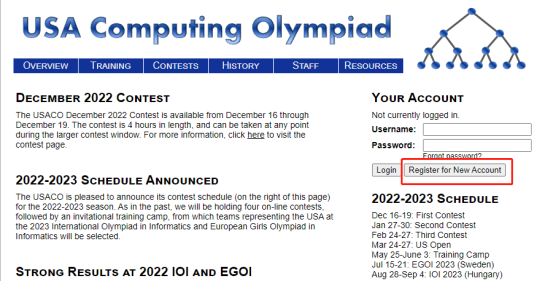
Step 1: Create an Account
Visit the official website:
http://www.usaco.org/
Click the “Register for New Account” button to create a new account.
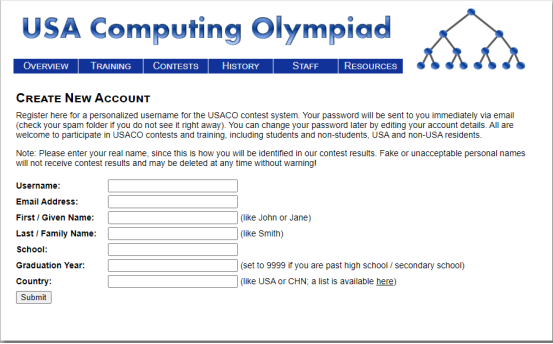
Step 2: Fill in Your Information
Complete your personal information in English, including:
-
Username
-
Email address
-
First name
-
Last name
-
School name
-
High school graduation year (enter 9999 if you have already graduated)
-
Nationality (students from China should enter CHN)
After completing the information, activate your account.
Step 3: Activate Your Account
After registration, you will receive an email containing your account username and default password.
Log in to the official website within 24 hours to activate your account. Once logged in, you may change your password.
Click “Login” on the website to access your account and participate in upcoming competitions.